PDF Data Extraction Pipeline: From Document Chaos to Automated Loan Processing
A consumer lending company was manually processing hundreds of PDF contracts, delivery receipts, and email uploads every week. Staff would open each document, read handwritten or digital fields, match contracts with receipts, rename files, extract data into spreadsheets, and then manually enter everything into their loan management system. The process was slow, error-prone, and did not scale.
I designed and built a two-phase system that automates this entire workflow. Phase 1 handles document classification, OCR, data extraction, and contract-receipt matching. Phase 2 takes the extracted data, matches it against the company's loan database, applies business rules, and generates XML files for direct import into their Nortridge Loan System.
| 99% matching accuracy | 1.5-3 min per batch | Down from 30+ min manual | 50+ production releases |
|---|
Context
Travis Capital Partners is a consumer lending company that purchases installment contracts from food service and appliance dealers. Every day, dealer offices send batches of new contracts and delivery receipts via email. Each batch contains a mix of:
- Handwritten contracts (single-page, photographed or scanned)
- Digital (electronic) contracts (multi-page PDFs with credit applications, ACH forms, and multiple contract types)
- Delivery receipts (often scanned images inside PDFs, photographed with smartphones)
- Outlook emails (.msg files) that serve as an index of what the batch contains
Before this system existed, an employee would manually:
- Open each PDF and identify what type of document it is
- Read buyer names, co-buyer names, amounts, payment terms, and product descriptions
- Match each contract with its corresponding delivery receipt
- Combine matched documents into a single PDF with a specific naming convention
- Enter all extracted data into a spreadsheet
- Log into the loan management system and manually create or update loan accounts
This took 30+ minutes per batch for an experienced employee, and mistakes were common, especially with handwritten contracts where OCR is unreliable by nature.
My Role
Full-Stack Engineer & Consultant
I owned the full technical scope: system architecture and technology selection, backend implementation (FastAPI, PostgreSQL, Celery, Redis), OCR and AI pipeline design (Google Document AI, OpenAI Vision), matching algorithm design, frontend implementation (React, TypeScript, Tailwind CSS), rule engine design for Phase 2, deployment and infrastructure (Railway, Docker), and direct collaboration with the CEO on requirements, edge cases, and iterative refinement.
Architecture
System Overview
The platform is a FastAPI backend with a React frontend, connected through a REST API. Heavy processing (OCR, AI extraction, PDF generation) runs asynchronously via Celery workers with dedicated queues for different workload types.
Data Model
The core data model tracks the lifecycle of each processing job from upload through extraction and output generation:
Analysis Job
├── Analysis Files (uploaded PDFs, images, emails)
│   ├── Analysis Pages (per-page status and renders)
│   ├── Analysis Results (extracted fields as JSON)
│   └── OCR Results
├── Analysis Matches (contract-receipt pairings)
├── Analysis Outputs (generated combined PDFs)
├── Extracted Rows (structured data for XLSX)
└── Analysis Logs (event tracking)
Phase 2 adds a separate data layer for loan processing:
Snapshot (daily NLS database import)
├── Loan Accounts
└── Contacts

Purchase Case (materialized from Phase 1 extraction)
├── Purchase Contracts
├── Proposed Actions (new account, reorder, transaction)
└── Audit Log

XML Batch (generated for NLS import)
Phase 1: Document Processing Pipeline
The Processing Flow
When a user uploads a batch of files, the system executes the following pipeline:
Key Technical Decision: Multi-Strategy OCR
The single hardest problem in this project was reliable text extraction across wildly inconsistent document quality. Handwritten contracts filled out with pen, scanned at various resolutions, sometimes photographed at odd angles. Digital contracts with embedded forms, varying layouts across dealer offices. Delivery receipts that are literally smartphone photos of signed paperwork.
No single OCR strategy handles all of these well. The solution was a fallback chain:
- Digital text extraction (PyMuPDF): try to extract text directly from the PDF layer. If the PDF contains selectable text, this is instant and perfectly accurate.
- Google Document AI: for scanned documents, use Google's OCR service which handles printed text and moderately clean handwriting well.
- OpenAI Vision (GPT-4o): for pages where Document AI fails or returns low-confidence results, render the page as an image and send it to GPT-4o's vision capability with a structured extraction prompt.
Each page is processed independently. If one page fails, the others continue. This per-page fault isolation was critical, because in a 15-page contract batch, having one badly scanned page should not block the other 14.
Bipartite Matching
Matching contracts to delivery receipts sounds simple until you account for the real-world variations:
- Buyer names are sometimes misspelled on one document but not the other
- Co-buyer fields are often blank on delivery receipts
- A single customer can have multiple contracts (food + appliance) but only one delivery receipt
- Some delivery receipts have no matching contract (expected behavior for certain offices)
- Some contracts have no delivery receipt (should be flagged)
The matching algorithm uses a bipartite approach. It extracts buyer name, co-buyer name, and ship-to names from both contracts and receipts, computes similarity scores with configurable thresholds (MATCHING_MIN_SCORE, MATCHING_MIN_GAP), and produces optimal pairings. When OCR confidence is low, the email body text serves as a supplementary signal for name resolution.
Email as a Contextual Signal
Early in the project, the client suggested using the email that accompanies each batch as an index. This turned out to be one of the most valuable signals in the system.
The email subject typically contains the date and office name. The email body lists each customer with their order type. The system parses .msg and .eml files, extracts this structured context, and uses it to:
- Fill in the office name for output filenames
- Resolve ambiguous buyer names from poorly scanned contracts
- Identify expected items when the contract field is blank or illegible
- Distinguish between expected unmatched receipts and actual missing documents
Output Generation
For each matched group, the system generates:
- A combined PDF following the naming convention:
Date - Office - Name - Item 1 - Item 2 - DR.pdf - Unmatched items are saved individually and flagged
- An XLSX report with all extracted fields, confidence scores, and review flags
- A ZIP download containing everything
Phase 2: Rule Engine and Loan Processing
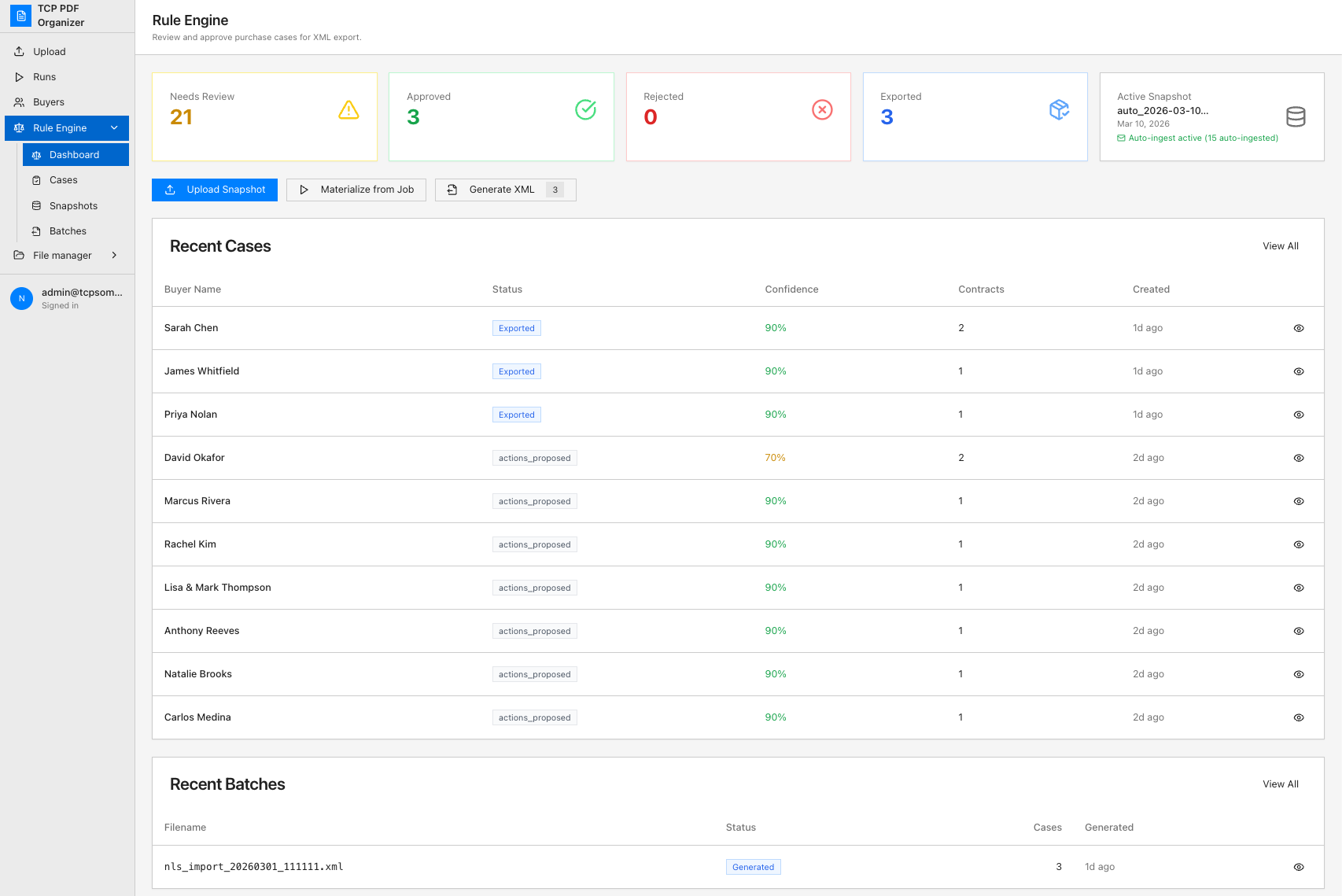
Once Phase 1 was stable and in daily use, the client introduced a second requirement: instead of manually entering extracted data into the Nortridge Loan System (NLS), automate the decision-making and generate XML import files.
The Business Logic
The rule engine handles these decisions for each extracted contract:
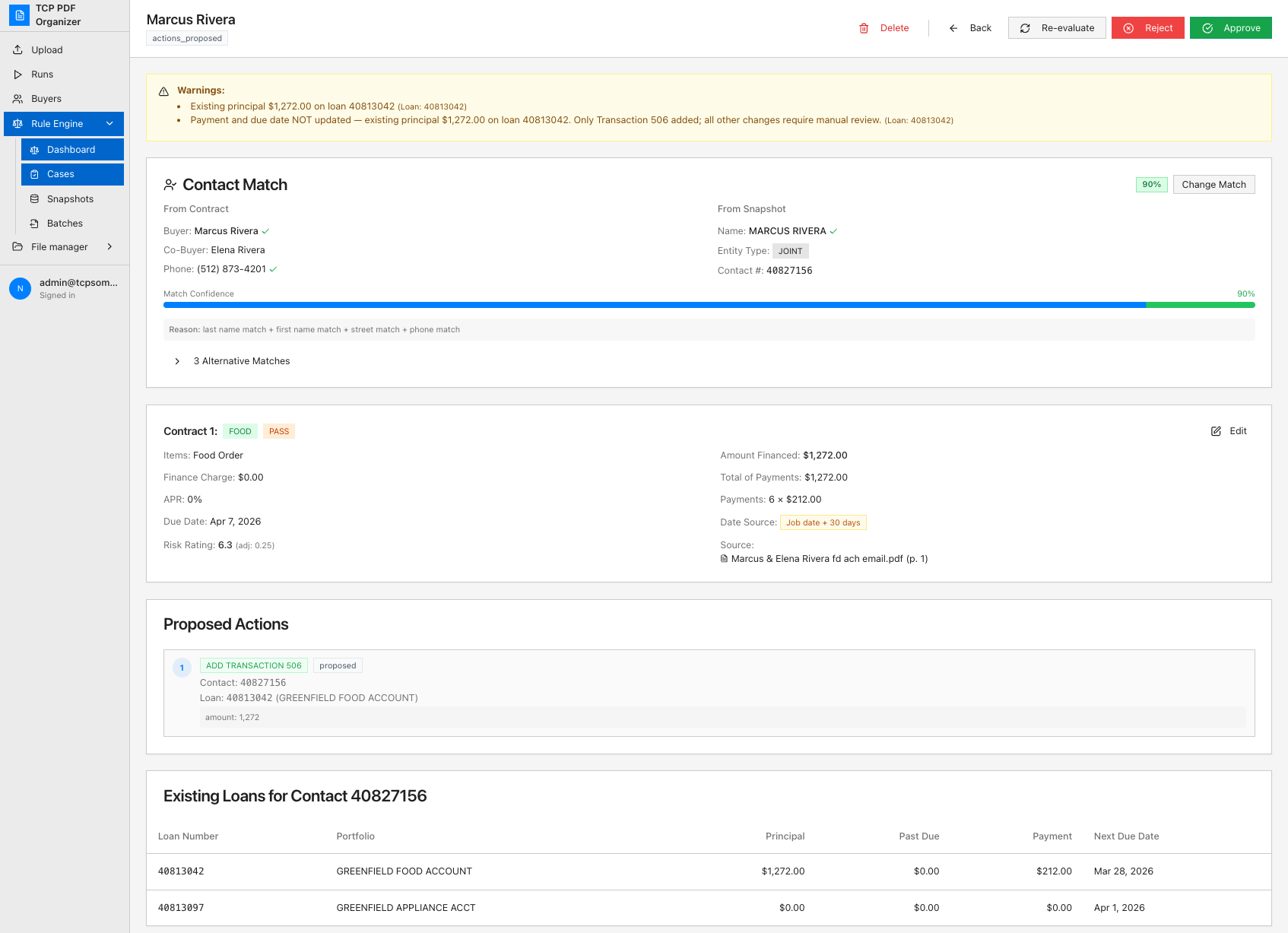
Each decision node produces a proposed action that the user reviews before XML generation. The system computes risk ratings, validates contract math (months x payment = amount financed), and handles office-specific rules for different dealer territories.
Automated Database Ingestion
Rather than requiring manual uploads of the loan database, the system monitors a dedicated email inbox via IMAP. The loan management system sends daily Contact and Account reports at 11 AM Eastern. The system checks the inbox every 15 minutes, filters by sender and subject keyword ("NLS"), extracts the XLSX attachments, and refreshes the snapshot automatically.
XML Generation
The final output is an NLS-compatible XML batch file containing loan creation records, transaction codes for reorders, and payment schedule updates. Each batch is isolated per user session, so two employees can work simultaneously without cross-contamination.
Production Hardening and Reviewer Safety
Once both phases were running daily, the work shifted from "build features" to "make a system that non-technical staff can trust with money." A consumer-lending pipeline cannot just be fast: a wrong loan amount or a silently dropped account is a real financial event. Most of the engagement after launch went into safety nets, observability, and a test suite that pins every bug that ever reached production.
Pre-export validation. Before any XML batch ships to the loan system, a validator sanity-checks every loan record, covering amounts, terms, field lengths (NLS rejects user-defined fields over 50 characters), and payment math, then surfaces errors and warnings inline. Reviewers can run a per-case "Preview XML" dry-run or validate an entire batch in the Generate Batch flow, seeing exactly what would fail before anything reaches NLS.
Import reconciliation. After a batch is imported, staff record how many loans NLS actually accepted. The system compares sent-versus-accepted and flags any gap on the batch, the batches list, and a dashboard health card, so a loan that silently fails to import cannot disappear unnoticed.
Snapshot staleness guards. Matching runs against a daily snapshot of the loan database. If that snapshot is older than a configurable threshold, the case detail shows an amber warning so reviewers never trust a match made against stale data.
A regression suite that remembers every incident. Every production bug became a named test: a misparsed generational name suffix, a due-date rule that went silent for weeks, a v1/v2 extractor merge that dropped line items. End-to-end "golden" tests run extracted-row fixtures through the full rules → XML chain, covering GFI, multi-contract, and co-borrower cases. Bugs that were fixed once stay fixed.
Observability and a self-auditing cron. Each pipeline boundary emits one greppable event=-tagged log line (rule evaluation, materialization, XML generation, batch lifecycle), and a weekly audit job re-scans for whole classes of silent regression, emailing only when it finds a new affected contract.
Operating it in production. When an upstream OpenAI billing outage took extraction down mid-day, I diagnosed and restored it the same day, then shipped fixes for the field-length rejection and a missing endpoint that surfaced during the incident. The system is run by non-technical staff; the engineering exists to keep it boring for them.
The Pivot That Shaped the Project
The project started as a Windows desktop application. After an initial prototype, I recommended pivoting to a web application. The reasoning:
- Maintenance: desktop apps require distributing and installing updates on every machine. Web updates are instant and transparent.
- Environment consistency: Windows apps are sensitive to OS versions, permissions, and antivirus configurations. A web app eliminates those variables.
- Onboarding: adding new team members requires no installation.
- Architecture alignment: the heavy processing already lived in a backend service. The desktop app was just a thin client, and a browser does that job with less friction.
The client agreed, and because the core processing logic was already isolated in the backend, the pivot cost almost no rework. This early architectural decision, keeping the UI layer thin and the processing layer independent, paid off immediately.
Outcomes
- Processing time: batches of 6-15 mixed documents complete in 1.5 to 3 minutes, down from 30+ minutes of manual work per batch.
- Matching accuracy: 99% success rate on contract-receipt pairing across handwritten and digital formats.
- In daily production use: the system processes real batches every business day, operated by non-technical staff with no developer intervention.
- Phase 2 operational: rule engine matches extracted contracts against the loan database and generates NLS-compatible XML for batch import.
- Automated ingestion: daily loan system snapshots are ingested automatically via IMAP, eliminating manual data uploads.
- Reviewer safety net: pre-export validation, batch import reconciliation, and snapshot-staleness guards catch financial-impact errors before XML ever reaches the loan system.
- Hardened over time: a growing regression and end-to-end golden test suite pins every production incident, backed by a weekly self-audit cron and event-tagged observability across the pipeline.
Reflections
Design for the document, not the happy path. The biggest source of bugs was assuming documents would be consistent. They are not. Handwritten contracts vary wildly. Scans are cropped, rotated, or low-resolution. The system needs to handle every variation gracefully, not just the clean samples provided during discovery.
Fallback chains over single-strategy bets. No single OCR technology handles every document type well. Chaining PyMuPDF, Document AI, and OpenAI Vision with per-page fault isolation made the system resilient without requiring any one technology to be perfect.
The email is not just metadata. What initially seemed like a secondary signal (the email that accompanies each batch) became one of the most important inputs for name resolution, office identification, and missing document detection. Listen to domain experts when they suggest something "might be useful."
Non-technical users will find every edge case. The system was designed by working directly with the client and watching how his team used it daily. Every week revealed new document formats, naming quirks, and workflow assumptions that were not visible during development. Building in a review step for low-confidence extractions saved the system's credibility with end users.
Speed gets you launched; safety nets keep you in production. The hardest and most valuable work came after the system was already "done." In a domain where a wrong number is a financial event, the validation gates, import reconciliation, and incident-driven regression suite are what let non-technical staff trust the system with real money every single day.
Separate the processing from the decision-making. Phase 1 (extraction) and Phase 2 (rule engine) are architecturally independent. Phase 1 produces clean structured data. Phase 2 consumes it and applies business rules. This separation meant Phase 2 could be designed and built after Phase 1 was already stable in production, without modifying the extraction layer at all.
The system is in active daily use at traviscapitalpartners.app (opens in new tab), processing document batches for Travis Capital Partners' lending operations.