In July 2024, I found a job on Upwork from Alan Rosinsky (opens in new tab), the owner of Metro Manhattan, a commercial real estate website in New York City. The job was mainly about a Zoho CRM (opens in new tab) integration and some webhook problems. The website was going down with 500 errors when it tried to send the tracking activity to Zoho.
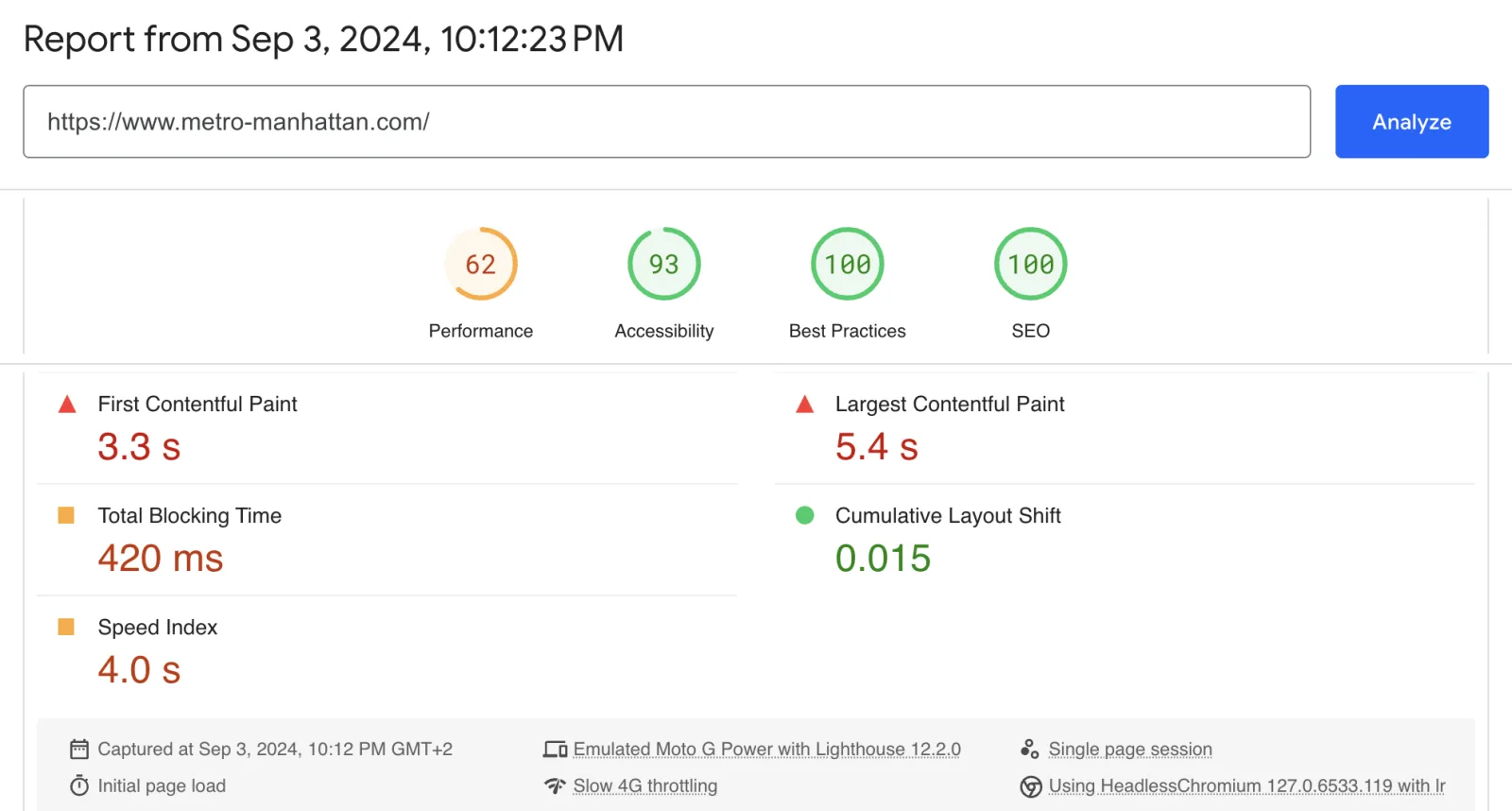
The listing didn't mention it, but there were also performance problems. The site felt fast when I used it, but Google PageSpeed Insights (opens in new tab) was giving it a mobile score of 62, and Core Web Vitals were failing all across the site. Alan had already been told that the performance problems could not really be fixed.
But the Zoho integration was the more immediate problem. Every time someone used the website, it was making a request to Zoho. When enough traffic was coming through, the server would eventually fall over and start throwing errors.
For a commercial real estate website, that is a much bigger problem than a low PageSpeed score. There's no point in optimizing a page that does not even load.
Context
Metro Manhattan is a New York City commercial real estate website with more than 900 pages. It has a large number of property listings and relies on organic search to bring people to those pages.
The site was difficult to work on for a few reasons. The tracking integration, built by an outside team, was taking the website down, while the Core Web Vitals problems affected the site as a whole, rather than just one page.
There was also no other technical person on the project. Alan is a non-technical business owner. That meant I had to investigate the problems myself and then explain what was happening and what I thought we should do about it.
My role
For the next 13 months, I was the sole technical person on the project. My work covered both technical SEO and development, including WordPress performance optimization, custom plugins, integrations, and tracking.
We managed the work through ClickUp and had weekly meetings. Alan would tell me what he wanted to accomplish, and I would work out how we should approach it technically.
The Zoho CRM integration that was taking the site down
The first problem to deal with was the Zoho CRM WordPress integration. The symptom was simple: the website would start throwing 500 errors. The more traffic the site received, the more likely it was that the server would fall over.
I started by looking through the logs to see what was actually happening. The problem wasn't that Zoho was rejecting too many requests. It was WordPress making a synchronous API request to Zoho on every single click and page view. The site was waiting for those requests to finish, and sending enough of them at once would take the server down.
On the first day, I explained the problem and the tradeoff to Alan. The integration was still relatively new, so pausing it would not really do any harm. Alan agreed, so I commented out the old functions and disabled that part of the system. The 500 errors stopped within a day.
The next step was rebuilding the integration so the website didn't have to wait for Zoho every time someone did something. Instead of sending everything on the spot, I created a WordPress table to store the events. A WP-CLI cronjob could then pick them up and send them to Zoho in batches of 50. Events stayed in the table until Zoho confirmed that it had received them, so that failed requests would not silently disappear. I also added a dashboard so we could see if there were any gaps in the data.
There was one more piece of the tracking system to get right. A user session is rewritten every time something happens on the page, with a one-hour TTL, so I kept sessions in Redis, which handles those frequent rewrites cheaply and expires them on its own. MySQL only needed to receive the finished session once.
This resulted in a simpler flow for the website:
WordPress speed optimization: passing Core Web Vitals on 921 pages
The second major problem was performance. Although the site felt fast when using it, Google was reporting that it was not the case. In September 2024, the mobile PageSpeed score was 62, and the Core Web Vitals were failing across the whole site.
Images
I started with the images, since these often end up being the problem. The image library was mostly PNG and JPEG files, so I converted them to WebP using Imagify. This took about a day and a half. While working on that, I also found that a lot of the images in the library were not being used anywhere on the site. I built a small admin tool to find those unused images, which made it easier to clean up the library. As soon as this was done, PageSpeed Insights showed improvements.
Critical CSS, one set per template
The next thing I looked at was the CSS. The homepage, for example, was loading styles that were only needed on the listings pages. The same thing was happening with other page types, so I went through the templates and worked out which styles were actually needed when the page first loaded.
After that I put the critical CSS directly into each template and deferred the rest until the user interacted with the page. This had to be done separately for each important template, rather than applying one solution to the whole site. The idea here is to load what the visitor needs immediately, instead of making the browser process styles for parts of the site that are not even visible yet.
Everything else
There were a lot of other smaller things that added up. I removed jQuery where it was not needed, along with WordPress emoji, oEmbed, and block CSS that the site was not using. I also preloaded the fonts using the Vite manifest.
I tuned WP Rocket (opens in new tab) and added a small plugin to handle cases where lazy rendering needed to be excluded. I added a 12-hour cronjob to clear the cache, so crawlers would not keep seeing stale versions of pages. During development, I wrote a small CLS reporter that logged layout shifts in the browser, which made it easier to find pages where elements were moving around after loading.
The server
After the WordPress changes, I also recommended moving away from AWS Lightsail to a dedicated server in New York. Alan bought the server and I configured it for the site. Since most of the site's visitors were in New York, having the server there also reduced the latency for those visitors.
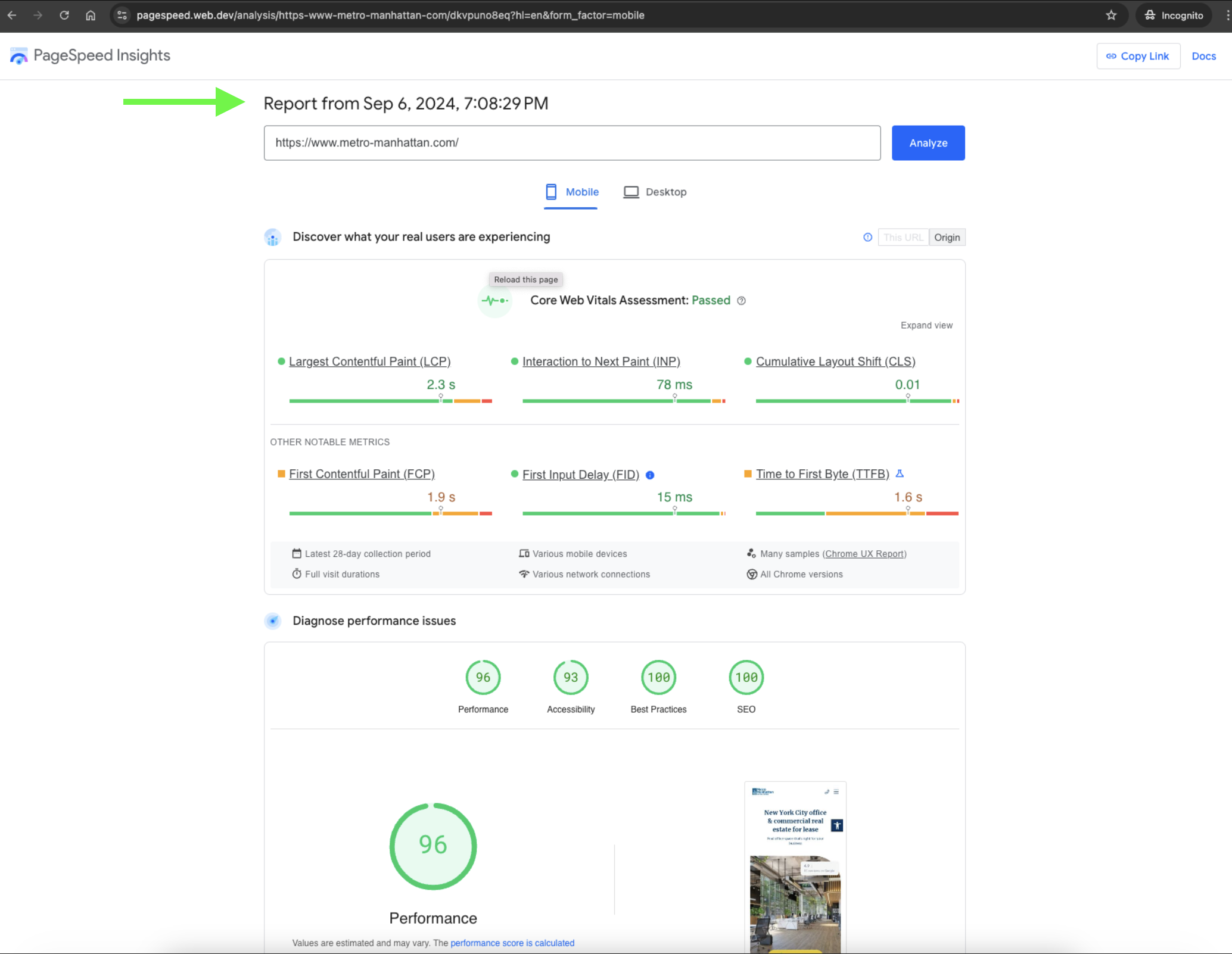
Three days after the first round of performance work, the mobile PageSpeed score went from 62 to 96, and the site was passing Core Web Vitals.
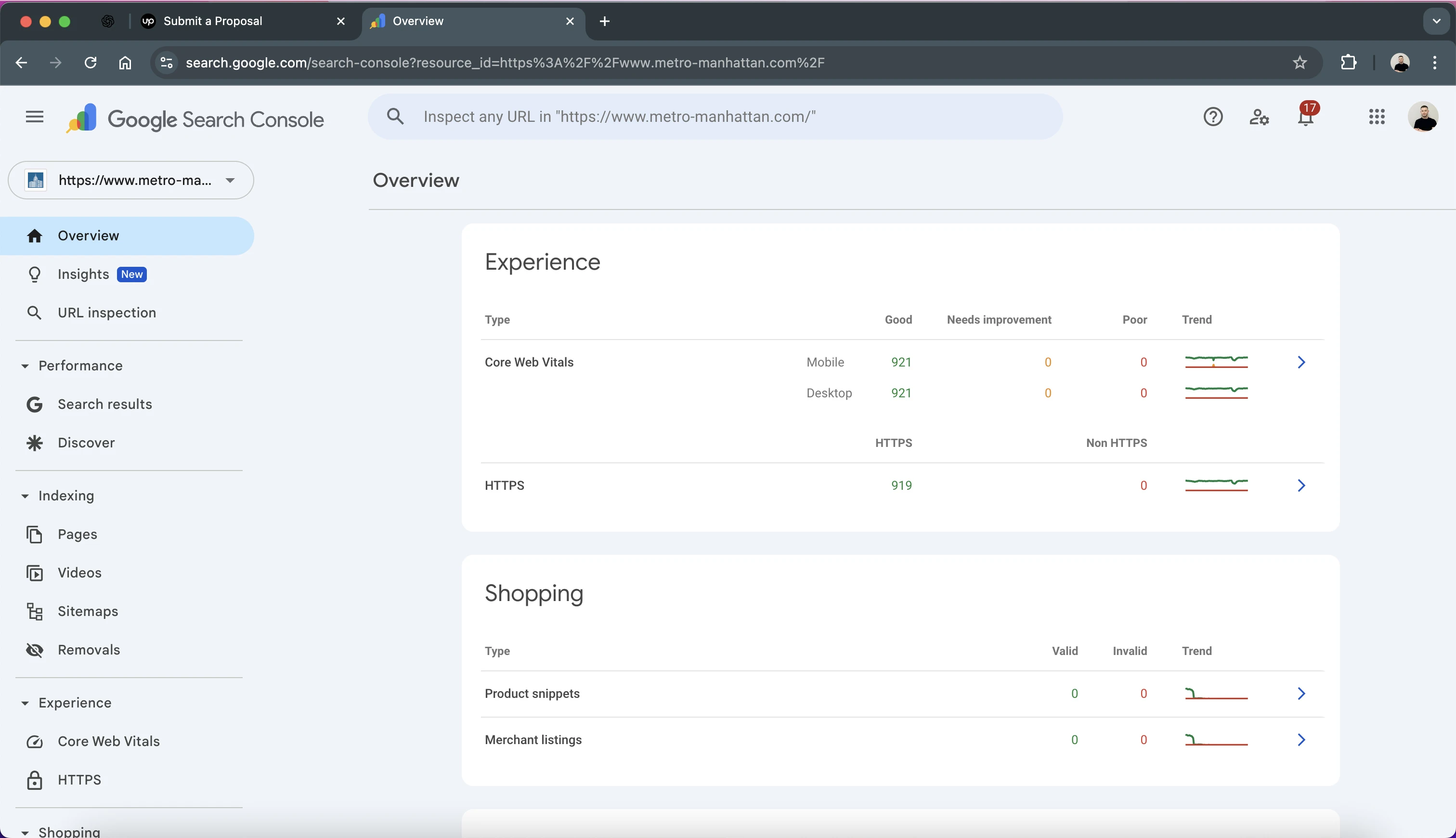
I also checked the indexed pages in Google Search Console, and all 921 pages were passing on both mobile and desktop.
What Alan could see
The tracking system was mainly built around registered users and what they did while using their own accounts. Alan could see which listings a user opened, how long they stayed on those pages, what they searched for, and whether they started filling out a contact form and then abandoned it. All of this data was sent to Zoho.
Alan already had another Zoho developer working on the CRM side, and they used this information to build the lead funnel there. This gave him a much better view of which users were actually showing interest in a property, rather than only seeing that someone had visited the site.
The important part for me was that the tracking was built around what Alan actually wanted to know about his users. The existing tools could tell him how many people visited a page, but they could not give him this kind of information about registered users and their activity.
| Event | Data sent to Zoho |
|---|---|
| User registration | user ID, name, email, geo info, registration time |
| User login | last login timestamp, session info |
| Page visits | session start/end, time spent, full page visit history |
| Form submissions | name, email, phone, message, form name, page URL |
| Email verification | verification status updates |
Tools I built for a 900-page site
With more than 900 pages, there was also a lot of SEO work that would have been difficult to do manually. I built three plugins to help with internal linking and content recommendations.
Internal linking recommender
The first was an internal linking recommender. It generated embeddings for the site's posts, pages, listings, and buildings, then used cosine similarity to find relevant pages to link to. GPT-4 generated the anchor text so that it fit the sentence where the link would be added. The plugin suggested the links inside the WordPress editor, but Alan confirmed each one before it went in. It ended up being around 768 lines of code.
Related content recommender
The second plugin handled related content. It used text-embedding-ada-002 to calculate similarity, then added a bonus for content in the same category and a penalty for older content. It also kept track of how often pages were being recommended, so the same popular page would not end up appearing everywhere. 643 lines of code.
Cornerstone post dashboard
The third was a dashboard for Yoast cornerstone content. It found posts that were not linking to cornerstone pages, found the best candidates using similarity, and then used Gemini 2.5 Flash to suggest the paragraph where the link would fit. The biggest plugin in the stack, 1,357 lines of code.
There were other smaller plugins as well, including an external link fixer, an OpenAI-powered admin chat, and the WP Rocket tuning plugin used for the performance work.
Outcomes
The first round of WordPress speed optimization took the mobile PageSpeed score from 62 to 96, and all 921 indexed pages were passing Core Web Vitals on both mobile and desktop.
Across the project, I resolved more than 75 WordPress issues and worked a total of 1,196 hours over two Upwork contracts. Both contracts received a 5.0 rating.
Client's written review, verbatim:
"Nemanja did an outstanding job on this project. Thanks to his expertise, my website now passes Google's Core Web Vitals, and most pages have a PageSpeed score above 90. He successfully resolved more than 75 issues related to our WordPress site—issues that the previous developer struggled with despite being paid for their work.
Nemanja was incredibly prompt and professional throughout the process. As a non-technical business owner, I appreciated his clear and transparent communication, which helped me understand the tasks and challenges involved. He consistently put in his best effort to resolve issues efficiently and effectively.
Having worked with Upwork for over ten years, I can confidently say that Nemanja is one of the best developers I've ever collaborated with. He has a strong work ethic, excellent communication skills, and a high level of technical expertise. Honest, reliable, and a pleasure to work with—I highly recommend him."
Alan Rosinsky, Principal Broker, Metro Manhattan
What I'd tell the next developer
1. Confirm before you delete. The Zoho problem was a good example of this. The obvious technical fix was to remove the integration, but that would also have removed something the client was actively using. Before changing anything, I explained what would happen if we paused it and what would happen if we left it running. In this case, the integration was still new, so pausing it was the safer option while I rebuilt it properly.
2. Look for the bulk endpoint. The original integration was making requests one at a time. If an external API supports bulk requests, consider using that. Instead of making the website wait for every request, the site could store the data somewhere and let a background job send it in groups. Here, it simplified the architecture, and improved the site's performance and reliability.
3. Explain things in if-then terms. With a non-technical client, explaining why something needs to change is often more useful than explaining the implementation. For example, instead of going into the CSS itself, I could explain that loading styles for content that is not visible yet slows down the page loading.
4. Write down why, not just what. One thing I would do differently is document more of the reasoning behind some of the systems. When I came back to the Redis session code later, I had to read through it again to remember why Redis was being used in the first place. The implementation made sense, but the reason for it was not written down anywhere.
Metro Manhattan is live at metro-manhattan.com (opens in new tab).