

What exactly is the SNS + SQS fanout pattern, and why does it matter for building robust event-driven systems?
Picture this: you’re running an e-commerce platform, and every time a customer places an order, you need to update inventory, send a confirmation email, trigger analytics, and maybe even notify a shipping partner. Each of these actions is handled by a different service, and you want them to react instantly and independently to the same event. This is where the SNS + SQS fanout pattern shines, offering a scalable, reliable way to broadcast events to multiple consumers without coupling them together.
Let’s break down how this pattern works, why it’s a favorite in cloud-native architectures, and how you can implement it step by step. We’ll also explore real-world scenarios, best practices, and common pitfalls—so by the end, you’ll be ready to wield the SNS + SQS fanout pattern like a pro.
What is the SNS + SQS Fanout Pattern?
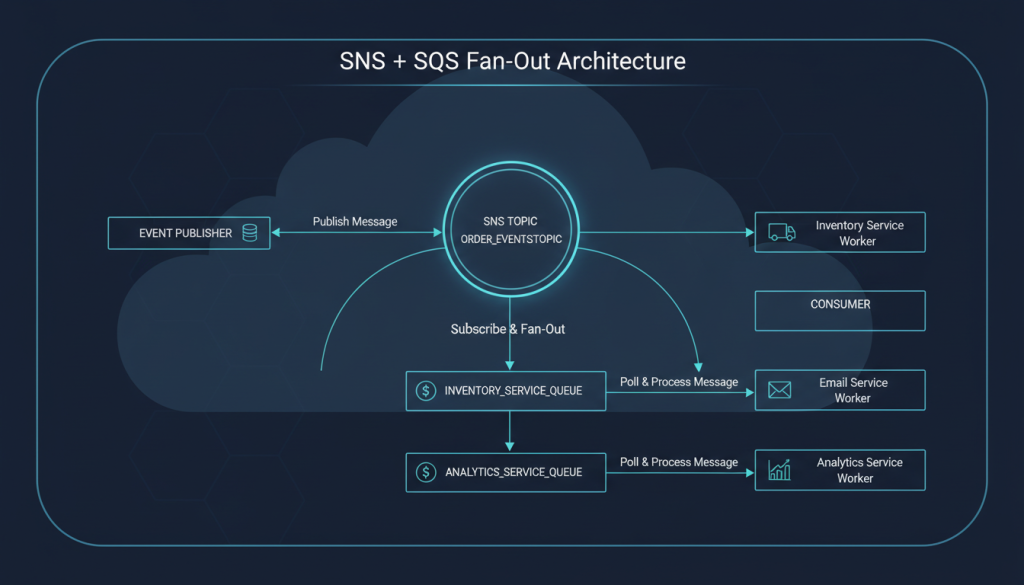
At its core, the SNS + SQS fanout pattern is a messaging architecture that combines two AWS services: Simple Notification Service (SNS) and Simple Queue Service (SQS). SNS acts as a publisher or broadcaster, while SQS queues act as subscribers or listeners. When an event is published to an SNS topic, it is instantly delivered to all subscribed SQS queues, which then hold the messages until each consumer is ready to process them.
Think of SNS as the town crier, announcing news to the whole village, and SQS queues as villagers who each take notes and act on the news in their own time. This decouples the event producer from the consumers, allowing each service to scale, retry, or process messages independently.
Why Use the SNS + SQS Fanout Pattern?
- Decoupling: Producers and consumers don’t need to know about each other. You can add or remove consumers without touching the publisher.
- Scalability: Each consumer can scale independently, processing messages at its own pace.
- Reliability: SQS queues provide durable storage, ensuring messages aren’t lost if a consumer is temporarily unavailable.
- Flexibility: You can mix and match different types of consumers—microservices, serverless functions, legacy systems—without changing the event source.
This pattern is a staple in event-driven architectures, especially when you need to broadcast the same event to multiple, independent systems.
How the SNS + SQS Fanout Pattern Works: A Step-by-Step Guide
Let’s walk through the mechanics of the SNS + SQS fanout pattern with a concrete example.
1. The Event Source Publishes to SNS
Suppose your order service detects a new purchase. It publishes an OrderPlaced event to an SNS topic called order-events.
2. SNS Broadcasts to All Subscribed SQS Queues
You have three SQS queues subscribed to this topic:
– inventory-queue (for updating stock)
– email-queue (for sending confirmation emails)
– analytics-queue (for tracking order metrics)
SNS instantly delivers the OrderPlaced message to all three queues.
3. Each Consumer Processes Messages Independently
- The inventory service reads from
inventory-queueand updates stock levels. - The email service reads from
email-queueand sends a confirmation email. - The analytics service reads from
analytics-queueand logs the event.
If any service is down, its queue holds the messages until it’s back up. No other service is affected.
4. Adding or Removing Consumers is Easy
Want to add a new fraud detection service? Just create a new SQS queue, subscribe it to the SNS topic, and you’re done. No changes needed in the order service or existing consumers.
SNS + SQS Fanout Pattern vs. Other Messaging Patterns
You might be wondering: how does this differ from other messaging approaches?
- Direct SQS Messaging: If you publish directly to an SQS queue, you’re limited to one consumer per queue. Fanout isn’t possible without extra logic.
- SNS to Lambda: SNS can trigger Lambda functions directly, but you lose the durability and retry features of SQS. If a Lambda invocation fails, the message can be lost unless you set up dead-letter queues.
- Kafka or RabbitMQ: These are great for high-throughput, low-latency messaging, but require more operational overhead and don’t integrate as seamlessly with AWS services.
The SNS + SQS fanout pattern strikes a sweet spot for reliability, simplicity, and cloud-native integration.
Real-World Use Cases for the SNS + SQS Fanout Pattern
Let’s look at some scenarios where this pattern is a game-changer.
1. E-Commerce Order Processing
As described above, a single order event can trigger inventory updates, emails, analytics, fraud checks, and more—all without the order service knowing who’s listening.
2. Microservices Event Broadcasting
In a microservices architecture, services often need to react to the same event. For example, a UserRegistered event might need to:
– Send a welcome email
– Create a user profile
– Trigger onboarding workflows
– Notify a CRM system
Each of these can be handled by a separate service, each with its own SQS queue.
3. IoT Device Telemetry
IoT devices can publish sensor data to SNS, which then fans out to multiple processing pipelines—real-time analytics, storage, alerting, and more.
4. Audit and Compliance Logging
Critical events can be broadcast to an audit queue, a monitoring queue, and a security queue, ensuring all compliance requirements are met without duplicating logic.
Deep Dive: How SNS and SQS Work Together
Let’s peek under the hood to see how these AWS services collaborate.
Amazon SNS (Simple Notification Service)
- Publisher/Subscriber Model: SNS topics receive messages from publishers and deliver them to subscribers.
- Multiple Protocols: SNS can deliver to SQS, Lambda, HTTP endpoints, email, SMS, and more.
- Push-Based: SNS pushes messages to subscribers as soon as they arrive.
Amazon SQS (Simple Queue Service)
- Queue-Based Storage: SQS stores messages until consumers are ready to process them.
- At-Least-Once Delivery: Messages are delivered at least once, and sometimes more (so consumers must be idempotent).
- Visibility Timeout: When a consumer reads a message, it’s hidden from others for a set time, preventing duplicate processing.
- Dead-Letter Queues: Failed messages can be sent to a special queue for later analysis.
How the Integration Works
When you subscribe an SQS queue to an SNS topic, SNS delivers a copy of each message to every queue. Each queue acts as a buffer, decoupling the producer from the consumers. This means:
– If a consumer is slow or temporarily down, messages aren’t lost.
– Each consumer can process messages at its own pace.
– You can add or remove consumers without touching the publisher.
Implementing the SNS + SQS Fanout Pattern: Step-by-Step
Let’s roll up our sleeves and build a simple fanout system using AWS. You can follow along in the AWS Console, with AWS CLI, or using Infrastructure as Code (like CloudFormation or Terraform).
Step 1: Create an SNS Topic
- Go to the SNS dashboard and create a new topic (e.g.,
order-events). - Note the topic ARN (Amazon Resource Name).
Step 2: Create SQS Queues
- Create one SQS queue for each consumer (e.g.,
inventory-queue,email-queue,analytics-queue). - For each queue, note the ARN.
Step 3: Subscribe SQS Queues to the SNS Topic
- In the SNS topic, add a subscription for each SQS queue.
- You’ll need to grant the SNS topic permission to send messages to each queue. This usually involves updating the SQS queue’s access policy to allow the SNS topic’s ARN.
Example SQS access policy snippet:
{
  "Effect": "Allow",
  "Principal": "*",
  "Action": "sqs:SendMessage",
  "Resource": "arn:aws:sqs:us-east-1:123456789012:inventory-queue",
  "Condition": {
    "ArnEquals": {
      "aws:SourceArn": "arn:aws:sns:us-east-1:123456789012:order-events"
    }
  }
}
Step 4: Publish Messages to the SNS Topic
- Use the AWS Console, CLI, or SDK to publish a test message to the SNS topic.
- Check each SQS queue to see that the message has arrived.
Step 5: Set Up Consumers
- Each service (inventory, email, analytics) polls its respective SQS queue and processes messages.
- You can use AWS Lambda, EC2 instances, containers, or on-prem servers as consumers.
Step 6: Monitor and Scale
- Use CloudWatch to monitor queue lengths, message age, and processing errors.
- Scale consumers up or down based on queue depth.
Best Practices for the SNS + SQS Fanout Pattern
Let’s make sure your implementation is not just functional, but also robust and production-ready.
1. Make Consumers Idempotent
Because SQS guarantees at-least-once delivery, your consumers might receive the same message more than once. Ensure that processing the same message twice doesn’t cause problems (e.g., double-charging a customer).
2. Use Dead-Letter Queues (DLQs)
Configure DLQs for each SQS queue. If a message can’t be processed after several attempts, it’s moved to the DLQ for later inspection. This prevents poison messages from clogging your main queue.
3. Monitor Queue Metrics
Track metrics like ApproximateNumberOfMessagesVisible (queue length) and ApproximateAgeOfOldestMessage to spot bottlenecks or consumer failures early.
4. Secure Your Queues and Topics
Use IAM policies to restrict who can publish to SNS topics and who can read from SQS queues. Don’t leave your messaging infrastructure open to the world.
5. Handle Message Ordering (if Needed)
Standard SQS queues don’t guarantee message order. If order matters, use FIFO queues—but note that SNS only recently added support for FIFO topics and queues, and there are some limitations.
6. Tune Visibility Timeouts
Set the SQS visibility timeout to be longer than your average message processing time. This prevents other consumers from picking up a message that’s still being processed.
7. Use Message Attributes
SNS and SQS support message attributes—key-value pairs that travel with the message. Use these to add metadata (like event type, priority, or correlation IDs) for smarter processing.
Common Pitfalls and How to Avoid Them
Even seasoned developers can trip up with the SNS + SQS fanout pattern. Here are some gotchas to watch for:
1. Forgetting to Update SQS Access Policies
If SNS can’t deliver messages to your SQS queue, check the queue’s access policy. It must explicitly allow the SNS topic’s ARN.
2. Not Handling Duplicate Messages
Assume you’ll get duplicates. Always design consumers to be idempotent.
3. Overloading Consumers
If your consumers can’t keep up, messages will pile up in the queue. Monitor queue depth and scale consumers as needed.
4. Ignoring Dead-Letter Queues
Without DLQs, failed messages can get stuck in your main queue, blocking new messages. Always configure DLQs.
5. Not Cleaning Up Unused Queues or Topics
Unused resources can clutter your AWS account and even incur costs. Regularly audit your SNS topics and SQS queues.
Advanced Patterns and Extensions
Once you’ve mastered the basics, you can extend the SNS + SQS fanout pattern in creative ways.
1. Filtering Messages with SNS Subscription Filters
SNS supports subscription filters, allowing you to send only certain messages to specific queues. For example, you might send only high-priority orders to a special queue.
Example filter policy:
{
  "eventType": ["OrderPlaced", "OrderCancelled"]
}
2. Combining with Lambda for Serverless Processing
You can subscribe Lambda functions to SQS queues for serverless, event-driven processing. This is great for lightweight, scalable consumers.
3. Chaining Fanout Patterns
You can chain SNS + SQS fanout patterns for complex workflows. For example, one consumer might publish a new event to another SNS topic, triggering a second round of fanout.
4. Integrating with Other AWS Services
SNS and SQS integrate with many AWS services:
– CloudWatch: For monitoring and alerting
– Kinesis: For real-time analytics
– Step Functions: For orchestrating workflows
– EventBridge: For advanced event routing
Case Study: Building a Resilient Notification System
Let’s walk through a real-world example to see the SNS + SQS fanout pattern in action.
Scenario
A fintech startup needs to notify users about account activity. Each event (like a deposit or withdrawal) should trigger:
– An email notification
– An SMS alert
– An update to the user’s activity log
– A fraud detection check
Solution
- Create an SNS topic called
account-activity. - Create four SQS queues:
email-queue,sms-queue,activitylog-queue,fraud-queue. - Subscribe each queue to the SNS topic.
- Each service (email, SMS, logging, fraud detection) polls its queue and processes messages.
- Add a new service (e.g., push notifications) by creating a new queue and subscribing it—no changes needed to the event source.
Benefits
- Each notification channel is isolated. If the SMS service is down, emails and logs still work.
- The system is easy to extend and maintain.
- No single point of failure or bottleneck.
SNS + SQS Fanout Pattern in the Context of Design Patterns
If you’re a fan of design patterns (and who isn’t?), you’ll notice the SNS + SQS fanout pattern is a real-world application of the Observer Pattern. The SNS topic is the subject, and each SQS queue is an observer, notified whenever an event occurs. This pattern is also closely related to the Publish-Subscribe (Pub/Sub) Pattern.
For a deep dive into the Observer Pattern in Python, check out Weather App: Mastering the Observer Pattern.
Troubleshooting and Debugging Tips
Even with the best setup, things can go sideways. Here’s how to debug common issues:
1. Messages Not Arriving in SQS Queues
- Check the SNS topic’s delivery status.
- Verify the SQS queue’s access policy allows the SNS topic.
- Look for subscription filter mismatches.
2. Consumers Not Processing Messages
- Check consumer logs for errors.
- Ensure the consumer has the right permissions to read from the queue.
- Monitor queue metrics for backlog.
3. Duplicate or Missing Messages
- Remember, SQS is at-least-once delivery. Handle duplicates in your code.
- If messages are missing, check for misconfigured filters or access policies.
Cost Considerations
The SNS + SQS fanout pattern is cost-effective, but costs can add up if you’re not careful.
- SNS: You pay per published message and per subscription delivery.
- SQS: You pay per request (send, receive, delete) and for data transfer.
- Consumers: If you use Lambda, you pay per invocation and execution time.
Monitor usage and set up billing alerts to avoid surprises.
When Not to Use the SNS + SQS Fanout Pattern
While this pattern is powerful, it’s not always the right tool.
- Low-Latency, High-Throughput Needs: If you need sub-millisecond latency or millions of messages per second, consider Kafka or Kinesis.
- Strict Ordering: If you need strict message ordering, use FIFO queues and topics, but be aware of their limitations.
- Transactional Messaging: If you need exactly-once delivery, SQS and SNS may not be sufficient.
Summary: Why the SNS + SQS Fanout Pattern is a Must-Have in Your Toolkit
The SNS + SQS fanout pattern is a cornerstone of modern, event-driven architectures. By decoupling producers and consumers, enabling easy scaling, and providing reliable message delivery, it empowers you to build systems that are both flexible and resilient.
Whether you’re running a startup or a global enterprise, mastering this pattern will help you design systems that are ready for anything—new features, new consumers, or sudden spikes in traffic. And with AWS handling the heavy lifting, you can focus on what matters: delivering value to your users.
Ready to put the SNS + SQS fanout pattern to work? Start small, experiment, and don’t be afraid to iterate. The more you use it, the more you’ll appreciate its elegance and power.
Further Reading & Next Steps
– Want to see how other design patterns fit into your architecture? Check out Chain of Responsibility Implementation in Java.
– Curious about strategy patterns for dynamic behavior? Explore Strategy Pattern in Java: Building a Delivery Management App.
– For more Java and event-driven tutorials, visit the Java category.
If you have questions or want to share your own SNS + SQS fanout pattern stories, drop a comment or connect with me. Happy building!